


Download LINE Desktop – desktop messaging, free voice and video calls, secure chat, screen sharing, auto-sync
Overview
LINE Desktop is a communication tool designed to extend the functionality of the popular LINE mobile app to personal computers. By enabling seamless messaging, free voice and video calls, and cross-device synchronization, it enhances digital connectivity for both personal and professional use. The app is particularly useful for users who spend significant time on their desktops and want to maintain consistent communication without switching between devices. It solves common challenges such as fragmented conversations, missed messages, and the need for multiple platforms by centralizing communication on a single interface.
Target users include remote workers, students, families, and professionals managing team collaborations. The app’s ability to support up to 200 participants in group video calls makes it suitable for large-scale virtual meetings, while features like screen sharing improve real-time collaboration. LINE Desktop ensures that users can access their messages, files, and shared content across all devices, reducing the risk of information loss or delays. This synchronization is especially valuable in fast-paced environments where timely communication is critical.
Developed by LINE Corporation, a well-established player in the messaging space, the app benefits from a mature infrastructure and a focus on user privacy. The developer did not provide additional technical details beyond the standard release information. The app plays a key role in the broader ecosystem of productivity and communication tools, offering a reliable alternative to fragmented messaging platforms.
Key Features & Functionality
- Free Voice & Video Calls: Users can initiate high-quality audio and video calls at no cost, with support for up to 200 participants in a single group call. This makes it ideal for virtual conferences, online classes, or large family gatherings.
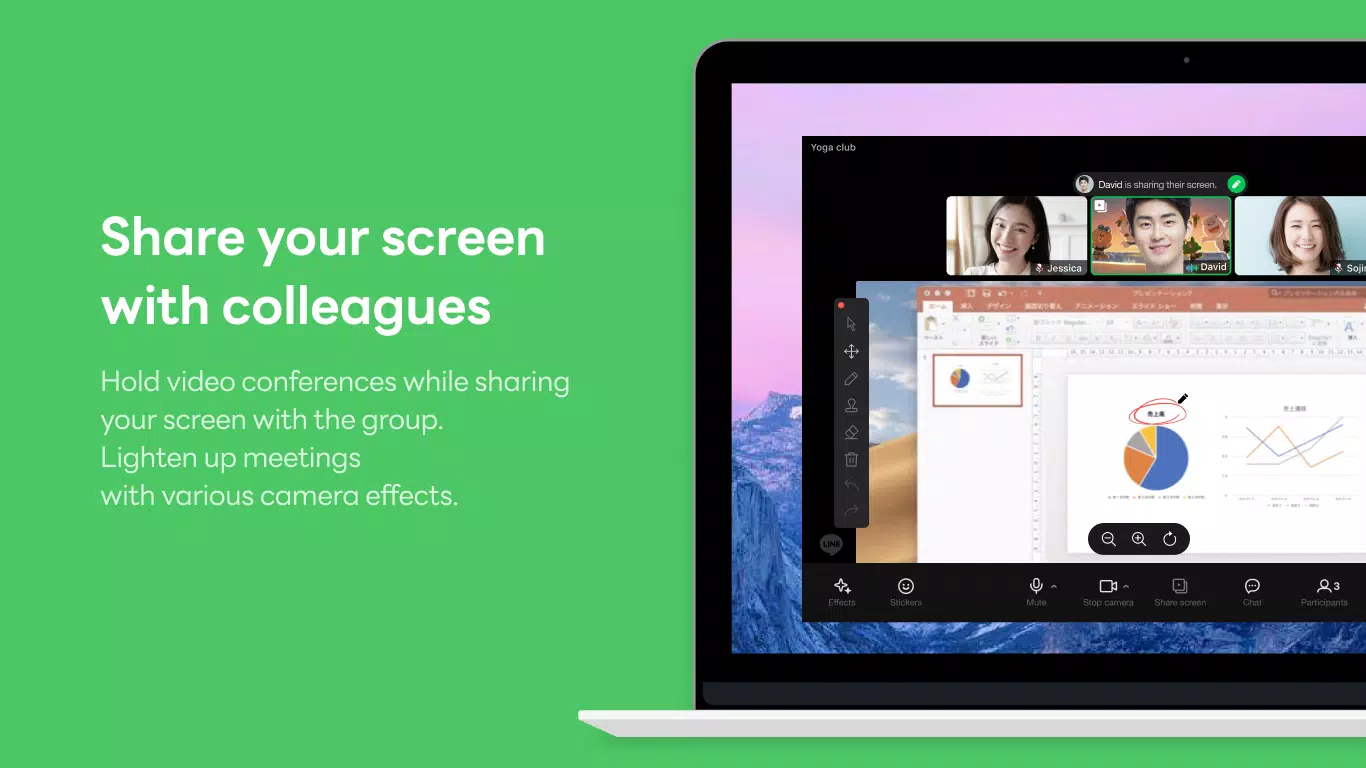
- Screen Sharing During Calls: During video meetings, users can share their screen in real time, enabling presentations, collaborative document editing, or remote troubleshooting.
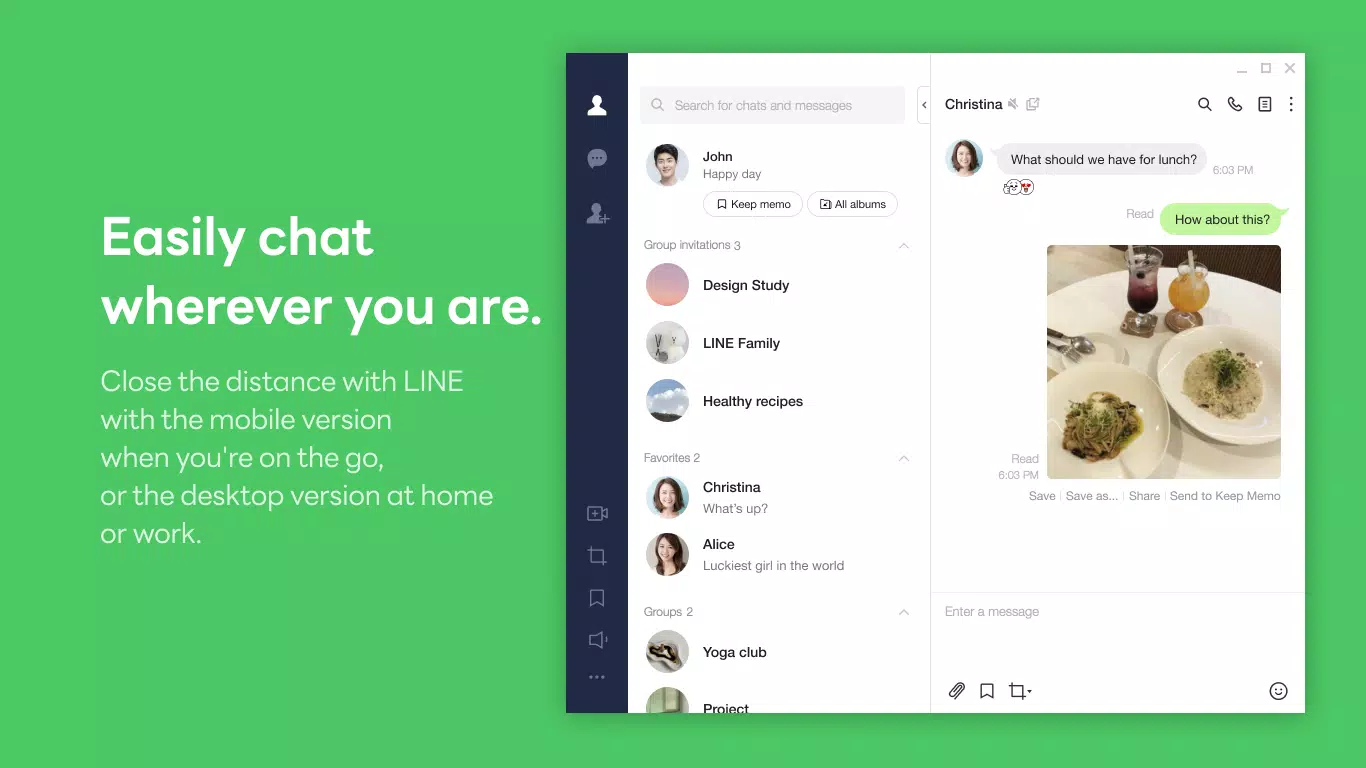
- Convenient Messaging Interface: The app supports the exchange of text, photos, videos, stickers, and large files, allowing for rich, expressive communication across different contexts.
- Auto-Sync Across Devices: All chats, files, and media are automatically synchronized between mobile and desktop versions, ensuring a continuous experience regardless of the device in use.
- Private Keep Memo: A secure feature for storing personal notes, reminders, and documents. Users can send memos and photos to a private chat for safekeeping and quick access.
- Letter Sealing Encryption: Messages, calls, and shared locations are protected with end-to-end encryption, ensuring that only intended recipients can access the content.
These features are designed to improve workflow efficiency and user experience. For example, a remote team can use screen sharing to walk through a project, while a student can use Keep Memo to store study notes. The integration of secure messaging and file sharing supports both casual and professional use cases, making LINE Desktop a versatile tool in daily digital life.
Interface, UX & Performance
LINE Desktop features a clean, intuitive interface that mirrors the mobile app’s design language, ensuring a familiar experience for existing users. The layout is organized into a sidebar for contacts and chats, with a central message area and a top toolbar for quick actions like starting a call or sharing a file. Navigation is straightforward, with minimal clicks required to access core functions.
The visual style emphasizes readability and responsiveness, using clear icons and consistent color coding for notifications. The app maintains smooth performance across different screen sizes and resolutions, though the developer did not list formal performance metrics. Although the developer did not list formal performance metrics, the app appears stable during typical usage scenarios, with minimal lag during calls and message delivery.
Responsiveness is consistent when switching between chat windows or initiating calls. The app handles large file transfers efficiently, and the auto-sync feature operates in the background without disrupting user activity. Stability is maintained during extended sessions, though users should ensure their system meets basic requirements for optimal operation. The developer did not specify minimum OS requirements or performance benchmarks.
Platform Compatibility & Technical Requirements
LINE Desktop is available for both Windows and macOS platforms. The current version is 7.16.0, with a file size of 246.8 MB. This size is relatively compact for a full-featured messaging and calling application, suggesting efficient resource management. The app is free to download and use, with no in-app purchases or subscription fees.
Compatibility information was not fully disclosed. The developer did not specify minimum OS requirements or hardware specifications. While the app is designed for desktop environments, users should verify that their system meets general standards for running modern desktop applications. The developer did not provide additional technical details about supported architectures or memory usage.
Pros and Cons
Pros
- Free to download and use with no hidden costs
- Supports high-quality voice and video calls with up to 200 participants
- Seamless auto-sync across mobile and desktop devices
- End-to-end encryption via Letter Sealing for enhanced privacy
- Screen sharing and file sharing capabilities for collaborative work
- Intuitive interface with consistent design across platforms
Cons
- Specific system requirements were not listed
- Performance on older or low-end devices was not verified
- Limited customization options for the interface layout
- No official support for Linux or other operating systems
- Auto-sync may consume bandwidth during large file transfers
FAQ
Is LINE Desktop safe to use?
Yes, LINE Desktop includes the Letter Sealing feature, which provides end-to-end encryption for messages, calls, and shared locations. This ensures that only the intended recipients can access the content, enhancing user privacy and security.
Can I use LINE Desktop on multiple devices?
Yes, your chats and files are automatically synchronized across all devices where you’re logged in. This allows you to switch between your mobile phone and desktop without losing conversation history or shared content.
Is there a cost to use LINE Desktop?
No, the app is completely free to download and use. There are no in-app purchases, subscription fees, or premium features that require payment.
How do I update LINE Desktop?
Updates are typically delivered automatically through the official download page or app store. Users can check for the latest version by visiting the LINE Corporation website or using the built-in update mechanism if available.
Does LINE Desktop support screen sharing?
Yes, users can share their screen during video calls to present documents, demonstrate software, or collaborate in real time. This feature is especially useful for remote work and online education.
Final Thoughts
LINE Desktop stands out as a powerful and secure communication tool that bridges the gap between mobile and desktop experiences. With its combination of free calling, auto-sync, screen sharing, and strong privacy protections, it delivers real value for users who rely on constant connectivity. Whether for remote work, virtual learning, or staying in touch with loved ones, the app offers a reliable, feature-rich platform.
Its clean interface and seamless cross-device functionality make it accessible to both tech-savvy users and those new to desktop messaging. While specific system requirements are not disclosed, the app’s lightweight size and stable performance suggest broad compatibility. For anyone seeking a secure, free, and productive messaging solution, LINE Desktop is a compelling choice.
Download LINE Desktop now


